
Advanced Inputs
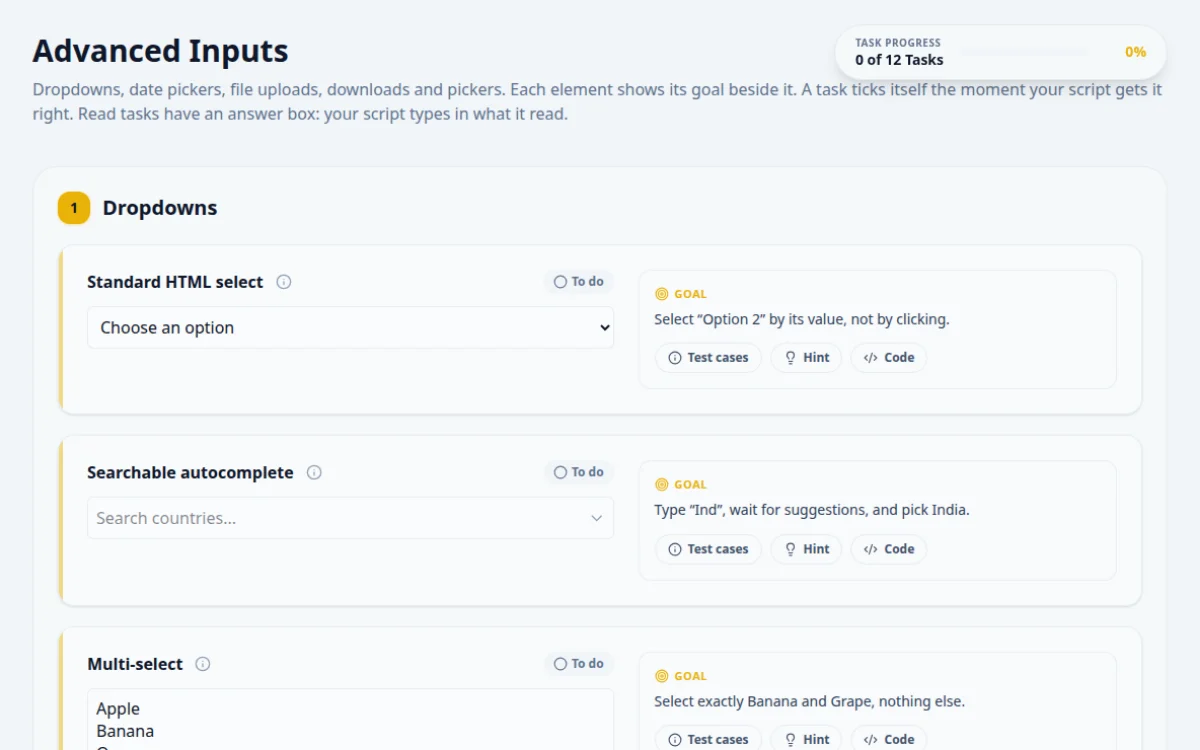
Dropdowns, date pickers, file uploads, downloads and pickers. Each element shows its goal beside it. A task ticks itself the moment your script gets it right. Read tasks have an answer box: your script types in what it read.
1.Dropdowns
Select “Option 2” by its value, not by clicking.
- The select shows Option 2
- Works the same in every browser
- Clicking the option text by coordinates
- Selecting by index when the order can change
Native <select> elements have a dedicated API in every tool. Use it rather than clicking the option.
await page.locator('#dropdown-standard').selectOption('option2');Type “Ind”, wait for suggestions, and pick India.
- The list filters to India and Indonesia
- Clicking India fills the input and closes the list
- Clicking before the suggestions render
- Picking Indonesia because it matched first
This is not a <select>. Type into the input, wait for the option element with the exact text, then click it.
await page.locator('#dropdown-searchable').fill('Ind');
await page.getByText('India', { exact: true }).click();Select exactly Banana and Grape, nothing else.
- Both stay selected together
- Apple and Orange stay unselected
- A plain click on Grape drops Banana
- Selecting all four
Multi-selects keep earlier picks only when you add to the selection. The select APIs accept several values at once.
await page.locator('#dropdown-multiple').selectOption(['banana', 'grape']);Assert the dropdown is disabled, then read its locked code and type it in the answer box.
- The script asserts the disabled state before reading
- The answer matches the code shown
- Trying to select an option (it must throw or be refused)
- Reading a hardcoded code: it changes on every visit
Check the disabled property or attribute first. The code is the text of the selected option.
await expect(page.locator('#dropdown-disabled')).toBeDisabled();
const code = await page.locator('#dropdown-disabled option').textContent();
await page.getByTestId('answer-dropdown-disabled').fill(code!);Choose Canada, wait for the state list to change, then choose British Columbia.
- The second list shows Canadian provinces after Canada is chosen
- British Columbia is selected
- Selecting the state before the list refreshes
- Assuming US states are still there
The second list is rebuilt when the first one changes. Wait for the new option to exist before selecting it.
await page.locator('#dropdown-country').selectOption('ca');
await page.locator('#dropdown-state').selectOption('bc'); // auto-waits for the option2.Date & Time
Set the date to 15 August 2030.
- The input holds 2030-08-15
- Works without opening the calendar popup
- Typing 15/08/2030: the value must be in ISO format
- Clicking through months in the popup (slow and flaky)
A native date input stores yyyy-mm-dd no matter how the browser displays it. Fill it with that format.
await page.locator('#date-picker').fill('2030-08-15');Set the time to 2:30 PM.
- The input holds 14:30
- Filling 2:30 PM: the stored value is 24-hour
Time inputs store HH:mm in 24-hour form, whatever the display shows.
await page.locator('#time-picker').fill('14:30');Set 31 December 2030, 11:59 PM.
- The input holds 2030-12-31T23:59
- Leaving out the T between date and time
- Using a 12-hour clock
datetime-local values look like yyyy-mm-ddTHH:mm.
await page.locator('#datetime-picker').fill('2030-12-31T23:59');3.File uploads
Upload a PNG or JPG. Then try a .txt file and check the error.
- An image shows “Selected: <name>”
- A non-image shows an error message
- Clicking the input to open the OS dialog: automation cannot drive it
- Ignoring the error case
Never click a file input. Send the file path straight to the input element.
await page.locator('#file-upload-single').setInputFiles('fixtures/photo.png');Upload two or more files in one go.
- Every file name appears in the list
- Uploading one file at a time: the second replaces the first
Pass all the paths in a single call.
await page.locator('#file-upload-multiple').setInputFiles(['a.txt', 'b.txt']);4.Downloads
Download the CSV, read the order total from inside the file, and type it in the answer box.
- The file is saved with a .csv name
- The answer matches the total inside the file
- Asserting only that a click happened
- Hardcoding the total: it changes on every visit
Wait for the download event, save the file, then parse it. The total is on the last line.
const [dl] = await Promise.all([
  page.waitForEvent('download'),
  page.locator('#download-csv').click(),
]);
const csv = fs.readFileSync(await dl.path(), 'utf8');
const total = csv.trim().split('\n').pop()!.split(',')[1];
await page.getByTestId('answer-download-csv').fill(total);5.Pickers
#3b82f6Set the colour to #22c55e (green).
- The swatch turns green
- The value is lowercase hex
- Opening the OS colour dialog
- Setting an rgb() string: colour inputs only take #rrggbb
Colour inputs accept a #rrggbb value directly. Set it and fire an input event.
await page.locator('#color-picker').fill('#22c55e');About this Advanced Inputs page
Advanced input automation covers controls that cannot be handled with a simple click or type: date pickers, range sliders and file upload fields. A test sets a date, moves a slider to an exact value, or attaches a file, then asserts the result. This free page gives scored tasks for each, with hints and solutions in Playwright, Selenium and Cypress.
Frequently asked questions
How do you upload a file in Playwright?
Call page.locator('input[type=file]').setInputFiles('path/to/file.pdf'). It works without opening the native dialog. For inputs created on click, use page.waitForEvent('filechooser') and then fileChooser.setFiles(). Pass an empty array to clear the selection.
How do you upload a file in Selenium?
Locate the input[type=file] element and call send_keys with the absolute file path in Python, or sendKeys in Java. Do not click the element first, because that opens the native dialog, which Selenium cannot control. The input must be present, though it can be hidden.
How do you automate a date picker?
For a native date input, send the value in yyyy-mm-dd format, or use fill() in Playwright. For custom calendars, click the field, move to the right month, then click the day cell. Assert on the input value afterward, not the visible calendar.
How do you set a range slider value in a test?
Press arrow keys on the focused slider for exact steps, or set the value with JavaScript and dispatch input and change events. Dragging by pixels is less reliable. Playwright's fill() also works on input[type=range]. Assert the displayed value.
Can I practice file uploads without a server?
Yes. This page runs in your browser and reads the chosen file locally, so no upload leaves your machine. Tasks include valid files and rejected ones, such as the wrong type or too large a size, so you can test both outcomes.
Free developer tools on Randomly.online
QA Playground is part of Randomly.online. These tools help while you write and debug tests: