
Dynamic Elements & Waits
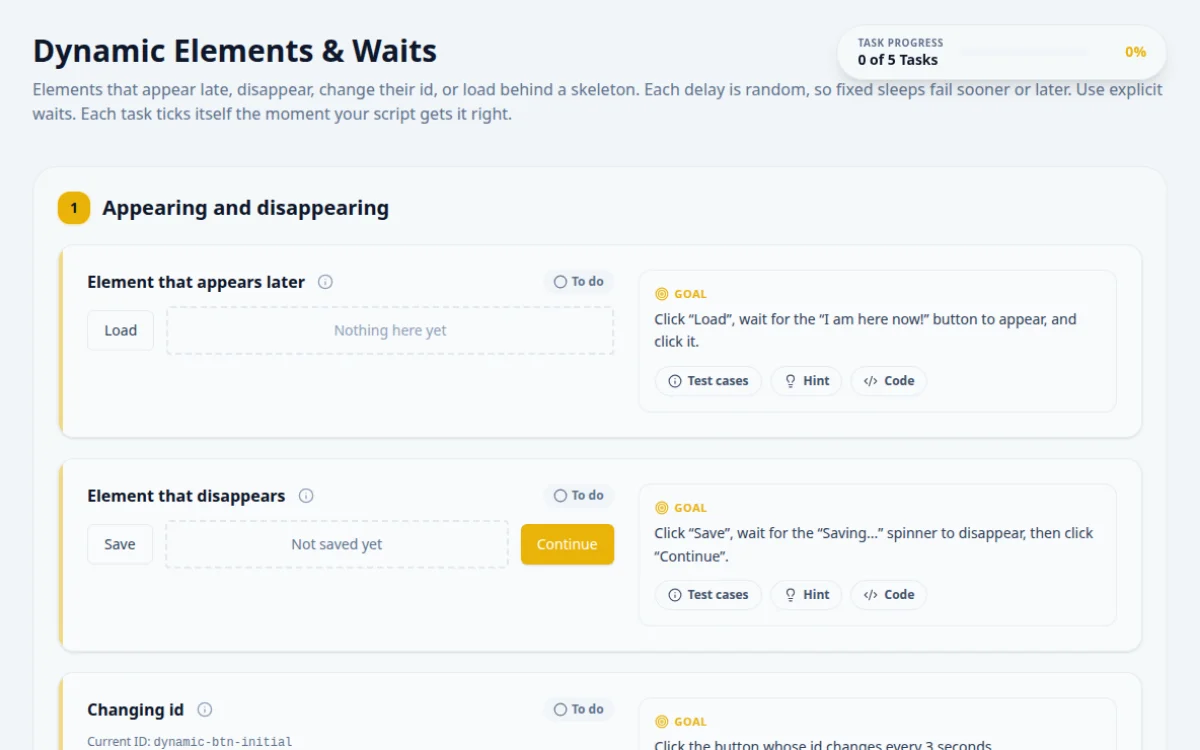
Elements that appear late, disappear, change their id, or load behind a skeleton. Each delay is random, so fixed sleeps fail sooner or later. Use explicit waits. Each task ticks itself the moment your script gets it right.
1.Appearing and disappearing
Click “Load”, wait for the “I am here now!” button to appear, and click it.
- The button appears after 2 to 5 seconds
- The click lands on the new button
- A fixed 3 second sleep: sometimes the button is not there yet
- Looking for the button straight after clicking Load
Wait for the button itself to become visible or clickable, with a timeout longer than the longest delay.
await page.locator('#btn-load-delayed').click();
await page.locator('#btn-delayed').click({ timeout: 8000 }); // click() waits for itClick “Save”, wait for the “Saving...” spinner to disappear, then click “Continue”.
- Continue is clicked only after the spinner is gone
- The page reads “Continued after save”
- Clicking Continue while it still says Saving: the page records it as too early
- Waiting for “Saved” text that might render before the spinner is removed
Wait for the spinner to be hidden or detached. That is a different wait from waiting for something to appear.
await page.locator('#btn-save').click();
await expect(page.locator('#saving-spinner')).toBeHidden({ timeout: 8000 });
await page.locator('#btn-continue').click();Current ID: dynamic-btn-initial
Click the button whose id changes every 3 seconds.
- The click lands, whatever the id is at that moment
- Copying the id from DevTools: it is gone 3 seconds later
- Finding the element once and reusing it after a change
Do not use the id. Use something that stays the same: the button text, its role, or a data attribute.
await page.getByRole('button', { name: 'My ID changes every 3s' }).click();2.Loading states
0% Complete
Start the task, wait for 100%, then type the receipt number that appears in the answer box.
- The receipt appears only at 100%
- The answer matches it
- Reading the receipt early: it is not there yet
- Polling the bar width in pixels instead of the text or aria value
Wait for the progress text to read “100% Complete”, or for the receipt itself to be visible.
await page.locator('#btn-start-progress').click();
await expect(page.locator('#progress-text')).toHaveText('100% Complete', { timeout: 10000 });
const receipt = await page.locator('#progress-receipt').textContent();
await page.getByTestId('answer-progress-task').fill(receipt!.match(/R-\d+/)![0]);Load the profile, wait for the skeleton to be replaced by real content, and type the username in the answer box.
- The answer matches the loaded username
- Reading text while the skeleton is showing: it has none
- Waiting on the skeleton’s animation instead of the content
Wait for the real content element, not for the placeholder to change.
await page.locator('#btn-load-profile').click();
const name = await page.locator('#profile-username').textContent({ timeout: 8000 });
await page.getByTestId('answer-skeleton').fill(name!);
About this Dynamic & Waits page
A dynamic wait is a rule that pauses a test until an element reaches a state, such as visible, enabled or containing text, instead of sleeping a fixed time. You practice it on a page where content loads asynchronously. In Selenium use WebDriverWait with ExpectedConditions. Playwright and Cypress retry assertions and actions automatically until a timeout.
Frequently asked questions
What is an explicit wait in Selenium?
An explicit wait is a WebDriverWait with a condition and a timeout. Selenium polls the condition, every 500 ms by default, until it returns a truthy value or the timeout expires. Use it for a specific element or state, for example element_to_be_clickable or visibility_of_element_located.
Why is Thread.sleep a bad way to wait for elements?
A fixed sleep is either too short, so the test fails on a slow run, or too long, so every run wastes time. A condition-based wait continues the moment the element is ready and fails only after a timeout you choose, which keeps tests faster and more stable.
Does Playwright need explicit waits?
Usually not. Playwright actions such as click and fill auto-wait for the element to be attached, visible, stable, enabled and able to receive events. Web-first assertions like expect(locator).toBeVisible() also retry until the timeout. Use waitFor only for states no action covers.
How does Cypress handle elements that appear late?
Cypress retries cy.get and most assertions until they pass or the default 4 second timeout ends. If an element needs longer, pass a timeout option to that command, for example cy.get('#result', { timeout: 10000 }). You do not add sleeps.
Should I mix implicit and explicit waits?
No. Selenium documentation warns that mixing them can produce unpredictable wait times. Set the implicit wait to zero and use explicit waits for each condition that needs one.
Free developer tools on Randomly.online
QA Playground is part of Randomly.online. These tools help while you write and debug tests: