
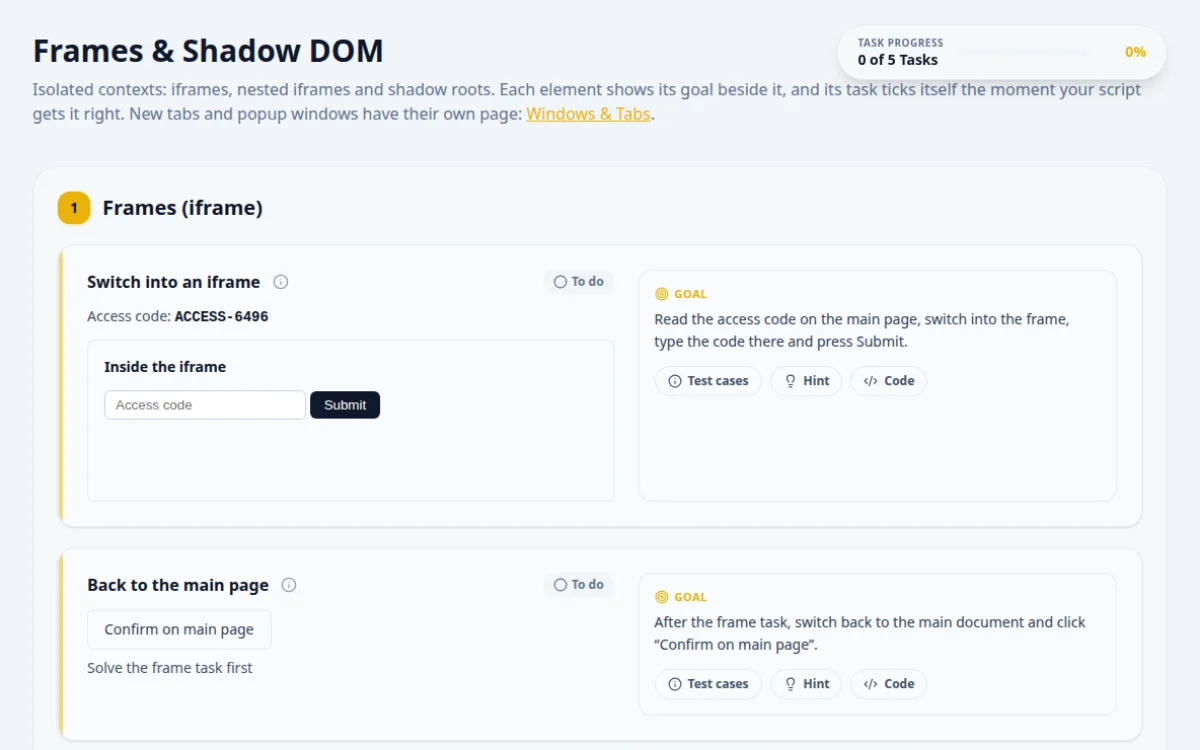
Frames & Shadow DOM
Isolated contexts: iframes, nested iframes and shadow roots. Each element shows its goal beside it, and its task ticks itself the moment your script gets it right. New tabs and popup windows have their own page: Windows & Tabs.
1.Frames (iframe)
Access code: ACCESS-3416
Read the access code on the main page, switch into the frame, type the code there and press Submit.
- The frame says “Code accepted”
- Looking for #frame-input from the main document: it is not there
- Typing the code before switching into the frame
Read the code first, while you are still on the main page. Then switch to the frame by its id or element.
const accessCode = await page.locator('#access-code').textContent();
const frame = page.frameLocator('#practice-iframe');
await frame.locator('#frame-input').fill(accessCode!);
await frame.locator('#frame-submit').click();
await expect(frame.locator('#frame-status')).toHaveText('Code accepted');Solve the frame task first
After the frame task, switch back to the main document and click “Confirm on main page”.
- The page says “Back on the main page”
- It only counts once the frame code was accepted
- Staying inside the frame: Selenium cannot find main-page elements from there
- Switching to the parent of a top-level frame instead of the default content
Selenium stays in a frame until you switch out. Playwright and Cypress scope to frames per call, so there is nothing to undo.
// frameLocator scopes only the calls made through it
await page.locator('#btn-main-confirm').click();Read the code inside the inner frame (a frame inside a frame) and type it in the answer box.
- The answer matches the inner frame’s code
- Switching straight to the inner frame from the main page
- Forgetting to come back out before typing the answer
Frames are entered one level at a time: outer frame first, then the inner one.
const inner = page.frameLocator('#outer-frame').frameLocator('#inner-frame');
const text = await inner.locator('#inner-code').textContent();
await page.getByTestId('answer-nested-iframe').fill(text!);2.Shadow DOM
Click the button inside the shadow root.
- The shadow root shows “Shadow button clicked”
- document.querySelector("#shadow-btn") returns null
- An XPath locator: XPath cannot cross a shadow boundary
Find the host element first, then search inside its shadow root. Playwright CSS locators pierce open shadow roots on their own.
await page.locator('#shadow-host #shadow-btn').click();
await expect(page.locator('#shadow-status')).toHaveText('Shadow button clicked');Read the code from the shadow root inside another shadow root and type it in the answer box.
- The answer matches the code
- Searching the outer shadow root only: the code is one level deeper
- Selenium CSS with descendant combinators across both roots
Each shadow root has to be opened from its own host. Chain them: outer host, its root, inner host, its root.
// Playwright pierces every open shadow root in one CSS locator
const text = await page.locator('#nested-shadow-host #nested-code').textContent();
await page.getByTestId('answer-nested-shadow').fill(text!);
About this Frames & Shadow DOM page
An iframe is a separate document embedded in a page, and a shadow DOM is an encapsulated element tree attached to a host element. Test tools cannot see inside either by default. To automate them, switch to the frame first (switchTo().frame in Selenium, frameLocator in Playwright), then locate shadow content with a shadow root API or a piercing selector.
Frequently asked questions
How do I switch to an iframe in Selenium?
Call driver.switchTo().frame() with an index, a name or id, or the iframe WebElement. Locate elements inside it as usual, then return with switchTo().defaultContent(). Forgetting to switch back is the most common cause of NoSuchElementException on the main page.
How do I handle an iframe in Playwright?
Use page.frameLocator('iframe#id') and chain locators from it, for example frameLocator('#pay').getByRole('button'). Playwright waits for the frame and auto-waits for elements, so no manual switching or switching back is needed.
How do I find elements inside a shadow DOM in Selenium 4?
Find the shadow host, call getShadowRoot() on it (Java) or shadow_root (Python), then use findElement with a CSS selector on that root. XPath does not work inside shadow roots. For nested roots, repeat the step per host.
Does Playwright pierce shadow DOM automatically?
Yes. Playwright CSS and role-based locators such as getByRole, getByText and locator('css') pass through open shadow roots at any depth. XPath selectors do not pierce them, so prefer CSS or user-facing locators.
How do I test an iframe or shadow DOM in Cypress?
Cypress has no built-in frame switching. Read the iframe body from its contentDocument and wrap it, or use a plugin. For shadow DOM, pass { includeShadowDom: true } to cy.get or set it in config so selectors pierce open roots.
Free developer tools on Randomly.online
QA Playground is part of Randomly.online. These tools help while you write and debug tests: