
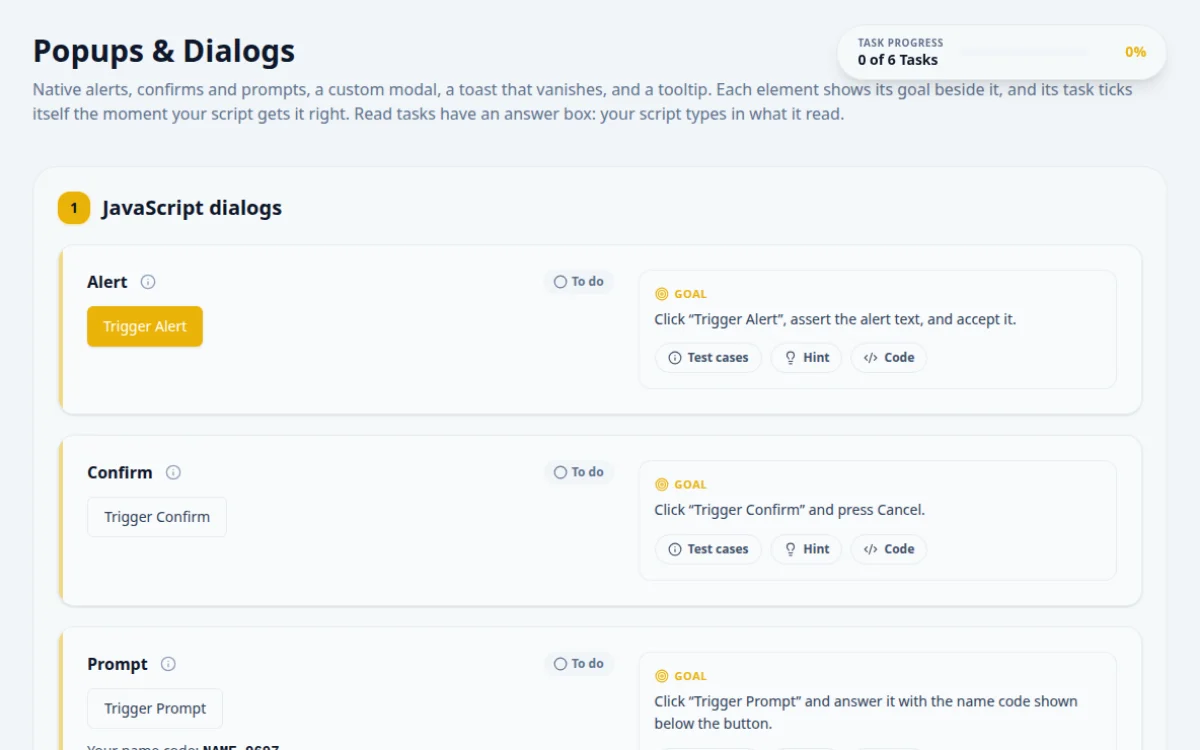
Popups & Dialogs
Native alerts, confirms and prompts, a custom modal, a toast that vanishes, and a tooltip. Each element shows its goal beside it, and its task ticks itself the moment your script gets it right. Read tasks have an answer box: your script types in what it read.
1.JavaScript dialogs
Click “Trigger Alert”, assert the alert text, and accept it.
- The alert says “This is a native alert dialog!”
- The page then reads “Alert was triggered and accepted”
- Not handling the dialog: Selenium throws UnhandledAlertException on the next command
- Registering the Playwright handler after the click
Native dialogs block the page. In Playwright, register the dialog handler before the click. In Selenium, switch to the alert after it.
page.once('dialog', async (d) => {
  expect(d.message()).toBe('This is a native alert dialog!');
  await d.accept();
});
await page.locator('#btn-alert').click();
await expect(page.locator('#alert-result')).toHaveText('Alert was triggered and accepted');Click “Trigger Confirm” and press Cancel.
- The page reads “Confirm cancelled”
- A toast says “You clicked Cancel!”
- Accepting instead of dismissing
- Leaving the default handler on: Playwright dismisses by default, Cypress accepts by default
Tools differ on what they do with an unhandled confirm. Say what you want explicitly.
page.once('dialog', (d) => d.dismiss());
await page.locator('#btn-confirm').click();
await expect(page.locator('#confirm-result')).toHaveText('Confirm cancelled');Your name code: NAME-4414
Click “Trigger Prompt” and answer it with the name code shown below the button.
- The page reads “Prompt returned: <code>”
- The code matches the one on the page
- Submitting the prompt empty
- Typing a hardcoded name: the code changes on every visit
Read the code from the page first. Then pass it as the prompt's answer when you accept the dialog.
const name = await page.locator('#prompt-code').textContent();
page.once('dialog', (d) => d.accept(name!));
await page.locator('#btn-prompt').click();
await expect(page.locator('#prompt-result')).toHaveText(`Prompt returned: ${name}`);2.Custom modal
Open the modal, close it once with Escape, then open it again and click Confirm.
- Escape closes it without confirming
- Confirm closes it and the page reads “Custom modal confirmed”
- Treating it like a native alert: it is ordinary HTML
- Clicking Confirm before the modal is visible
This modal is part of the page. Wait for it to be visible, then use normal locators and keyboard presses.
await page.locator('#btn-open-modal').click();
await page.keyboard.press('Escape');
await expect(page.locator('#custom-modal')).toBeHidden();
await page.locator('#btn-open-modal').click();
await page.getByRole('dialog').getByRole('button', { name: 'Confirm' }).click();
await expect(page.locator('#modal-result')).toHaveText('Custom modal confirmed');3.Toasts and tooltips
Place the order, read the order number from the toast before it disappears, and type it in the answer box.
- The answer matches the number in the toast
- Sleeping before reading: the toast is gone after 3 seconds
- Hardcoding the number: it changes on every visit
Wait for the toast to be visible and read it straight away. Pull the number out with a regular expression.
await page.locator('#btn-show-toast').click();
const text = await page.locator('#toast-message').textContent();
await page.getByTestId('answer-toast').fill(text!.match(/ORDER-\d+/)![0]);Hover the button, read the tooltip, and type the tip code in the answer box.
- The tooltip appears on hover (and on keyboard focus)
- The answer matches the code in the tooltip
- Reading the tooltip without hovering: it is not in the DOM until then
- Using the title attribute: this tooltip is a real element
The tooltip is added on hover and linked to the button with aria-describedby. Hover, then read the element with role tooltip.
await page.locator('#btn-hover-tooltip').hover();
const tip = await page.getByRole('tooltip').textContent();
await page.getByTestId('answer-btn-hover-tooltip').fill(tip!.match(/TIP-\d+/)![0]);
About this Popups & Dialogs page
A JavaScript dialog is a browser-native popup, such as alert, confirm or prompt, that blocks the page until it is handled. In Selenium you switch to it with driver.switchTo().alert() and call accept, dismiss or sendKeys. Playwright uses the page dialog event, and Cypress listens to window:alert and window:confirm. HTML modals are normal elements and need regular locators.
Frequently asked questions
How do you handle an alert in Selenium?
Call driver.switchTo().alert() in Java, or driver.switch_to.alert in Python, then use accept() to click OK or dismiss() to cancel. Use getText() to read the message. Wrap the switch in WebDriverWait with ExpectedConditions.alertIsPresent() so the test does not fail with NoAlertPresentException.
How do you handle a confirm dialog in Playwright?
Register page.on('dialog', dialog => dialog.accept()) or dialog.dismiss() before the click that opens it. Playwright auto-dismisses dialogs if no listener exists, so the handler must be attached first. Use page.once for a single dialog, and dialog.message() to assert the text.
How do you type into a JavaScript prompt?
In Selenium call alert.sendKeys('text') then accept(). In Playwright call dialog.accept('text'). In Cypress stub window.prompt with cy.window().then(win => cy.stub(win, 'prompt').returns('text')). Dismissing a prompt returns null to the page, which is a useful negative test.
What is the difference between a JavaScript alert and a modal dialog?
An alert, confirm or prompt is drawn by the browser, blocks all script and cannot be found with locators. A modal is ordinary HTML and CSS in the DOM, so you locate its buttons like any element and wait for it to be visible. They need different automation code.
How do you test an alert in Cypress?
Cypress accepts alerts automatically and fires window:alert. Assert the message with cy.on('window:alert', text => expect(text).to.equal('Hello')). For confirm, return false from cy.on('window:confirm') to cancel. Register the listener before the action that triggers the dialog.
Free developer tools on Randomly.online
QA Playground is part of Randomly.online. These tools help while you write and debug tests: