
Flaky Page
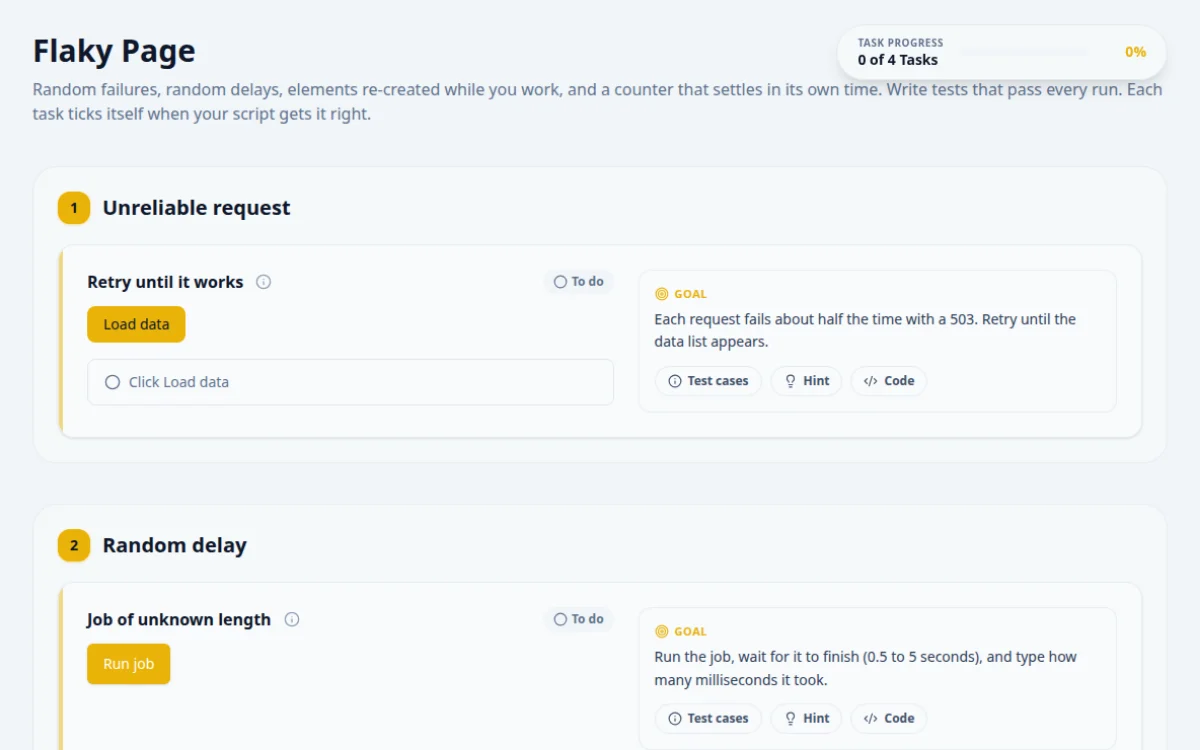
Random failures, random delays, elements re-created while you work, and a counter that settles in its own time. Write tests that pass every run. Each task ticks itself when your script gets it right.
1.Unreliable request
Each request fails about half the time with a 503. Retry until the data list appears.
- The list of three orders is shown and the result reads “Data loaded”
- The retry loop has an upper limit
- Assuming one attempt succeeds
- Checking the outcome before the request finishes
- An endless loop
In a bounded loop: click, wait for either the list or the error, stop when the list is there.
for (let attempt = 0; attempt < 20; attempt++) {
  await page.locator('#load-data').click();
  await expect(page.locator('#flaky-data, #flaky-error')).toBeVisible();
  if (await page.locator('#flaky-data').isVisible()) break;
}
await expect(page.locator('#flaky-data li')).toHaveCount(3);2.Random delay
Run the job, wait for it to finish (0.5 to 5 seconds), and type how many milliseconds it took.
- The answer matches the number in “Done after N ms”
- A fixed short sleep reads the page before the job finishes
- A fixed long sleep wastes up to 5 seconds every run
Wait for the result element to appear, then pull the number out of its text.
await page.locator('#slow-button').click();
const text = await page.locator('#slow-result').textContent({ timeout: 7000 });
await page.getByTestId('answer-random-delay').fill(text!.match(/\d+/)![0]);3.Re-rendered list
Click Target. The buttons are replaced with new DOM nodes shortly after load and on every refresh.
- Clicking Target shows success
- Selenium: a stored WebElement throws StaleElementReferenceException after a refresh
- Cypress: an alias saved before the refresh points at a detached node
Look the element up again right before each action instead of keeping it.
// Locators re-resolve on every action, so a re-render is harmless
await page.locator('#refresh-list').click();
await page.locator('#rerender-list').getByRole('button', { name: 'Target' }).click();4.Async counter
Start the counter, wait until it shows 3 with a retrying assertion, then press Verify.
- Verify is pressed only once the counter reads 3
- Reading the counter right after Start gets 0 or a value on the way
- Pressing Verify early turns the result red
Use an assertion or wait that retries until the text is 3, not one that reads it once.
await page.locator('#start-counter').click();
await expect(page.locator('#async-counter')).toHaveText('3', { timeout: 5000 });
await page.locator('#verify-counter').click();
5. Solutions
Try the challenges yourself first. Reference solutions are hidden until you ask for them.
About this Flaky Page page
A flaky test passes and fails on the same code. Causes include fixed sleeps, race conditions, shared state and elements re-rendered mid-test. This page injects random failures, delays and DOM re-renders so you can reproduce them. Fix them with condition-based waits, fresh locators, web-first assertions and bounded retries instead of longer sleeps.
Frequently asked questions
What is a flaky test?
A flaky test gives different results on repeated runs without any change to the code or the test. Typical causes are timing, shared test data, network variance and unstable locators. The result cannot be trusted either way, so it should be fixed or quarantined.
How do I fix a StaleElementReferenceException?
The element was removed or re-rendered after you found it. Locate it again right before use, or wait with an expected condition that re-finds it, such as element_to_be_clickable. In Playwright, locators are lazy and re-resolve on each action, so this rarely occurs.
Should I use retries to deal with flaky tests?
Retries keep a pipeline moving but hide the cause. Playwright supports retries in config and Cypress has test retries since version 5. Use them as a stopgap, track tests that needed a retry, and fix the underlying wait or locator.
Why do tests pass locally but fail in CI?
CI machines are usually slower, run in parallel and have less memory, so timing assumptions break. Replace sleeps with condition waits, avoid shared data between tests, and add traces or videos on failure to see what the page looked like.
How can I find the cause of a flaky test?
Run it many times, for example Playwright's --repeat-each, and compare failing traces to passing ones. Look for an action that ran before the page was ready, or an element replaced between find and click. Fix the timing at that step.
Free developer tools on Randomly.online
QA Playground is part of Randomly.online. These tools help while you write and debug tests: